loader image

Category Archive : WooCommerce Plugins

How to use the “Drop a Hint” feature plugin for your e-commerce website?

Some well-known international brands use Drop A Hint, a cutting-edge and distinctive conversion software in WordPress/Woocommerce websites.

Drop a hint is wholly integrated with WordPress/WooCommerce website.

Give your visitors the option to write down their wishes on “Smart Hint Cards” and email them to their chosen recipient.

For any events, your store needs, create branded “HINT CARDS” and messages! You can double your sales by allowing “browsing” visitors to send your product to potential customers.

Unlimited customization choices and one-click installation for smooth integration with your store. Responsive device integration across all platforms.

You get the gift you really want when you “Drop A Hint”. Allow your visitors to convey their best wishes to the one individual who is most likely to buy this item.

How does your store’s “Drop a Hint” extension function?

By using the “Drop a Hint” option, which is adjacent to the “ADD TO CARD” button, your customers can send an electronic hint card to a specific individual. 

A nicely designed Hint Card with a live link to the exact product the browsing customer “hinted” is sent to the Hint Receiver through personal email.

Your four custom-designed cards will be available for your visitors to select. In addition, the “Capture Item” hint card option is available in our plugin. 

In essence, these cards will display the precise object being hinted at together with the graphic you designed for your hint card.

The Drop A Hint records and preserves both emails (from the sender and the recipient) in a helpful data spreadsheet. You can have your email fetching lists automatically synced with Drop a Hint.

Having valuable email addresses associated with particular things will help you appropriately target your future marketing efforts based on actual data rather than just educated assumptions.

You can now customize and improve your mail-out marketing and retargeting efforts, as well as provide targeted discounts that will actually increase sales.

Business owners receive real-time notifications about which products in their store are hints. That is a thorough investigation of your “Unknown data.”

It would not have been easy to know what your visitors wanted or liked if you hadn’t used our app, but it will give you a window into their web activity.

“Drop a Hint” is a brilliant feature that enables users to send their loved ones an exquisite email with the finished product attached. Additionally, it serves as a marketing tool for your business.

Some important features:

Target visitors with pertinent content depending on how they have interacted with your brand. For example, to encourage first-time customer sales, send customized communications.

Robust built-in automation and integrations.

You save time and increase conversion as well as the ROI (Return on Investment) through this quick and easy-to-kick-off setup:

  •  You can provide a variety of “subscribe to the newsletter” features.
  • It should include a call-to-action button, such as “Shop Now”.
  • Verify that the email is not going into the spam folder.
  • To find out how many people are utilizing it, ask your developer to embed Google Analytics monitoring code in the “Drop A Hint” form and email.

Installation Instructions

  • Install the Woo Choice plugin through the WordPress.org plugin directory or by downloading it.
  • Go to Drop hint and activate it.
  • Open the Drop a Hint that you now see in your WordPress admin section.
  • To mark your hint cards any way you like, log into your Drop a Hint account. You’ve finished! You can now start selling more.
product video swatches

Free Video and Image variation swatches for your WooCommerce store

Free Video & Image Variation Swatches for WooCommerce

Video and image gallery Variation Swatches for your WooCommerce website is a well-curated tool by Woo Choice Plugin which offers a refined display for your product variations and helps you generate tons of sales.

Let’s create a brand-new experience for your WooCommerce product variations with Woo Choice Plugin’s Variation Swatches.

OVERVIEW OF FEATURES WE OFFER

  • Free Variation Swatches For WooCommerce

  • Image & Video Swatches On Shop/Product/Category Pages

  • Embed Free Videos On Shop/Category/Product Page

  • Responsive on different screen sizes & browsers

  • Easy to use User Interface

  • Seamless Customizations

  • Highly Compatible

  • Suitable To All Browsers
  • 3 different Swatch types (colour, image, Video Gallery)

  • No coding required

  • Easy to use backend interface

  • Enable/Disable Swatches for Shop page

  • Responsive for mobile, tablet device

  • Shortcode support

  • Control attribute setting globally.

  • Override global swatch settings for each product individually

Create Interactive User Experience With Interactive Videos [Chill😎, It’s Free]

Add Interactive product videos to your item and category page, polish your product display & make your sales go BOOM. That’s the way to go.

Let The Videos Do The Magic For You

A picture may speak a thousand words, but an Interactive video surely will speak a lot more than that. It may sound a bit poetic, but it has a point. 

  • Videos drove 11% more conversions. More conversions mean more sales.
  • Create an impactful WooCommerce product gallery with high-quality videos.
  • Free Videos on shop/category/product pages. You’ll never find this somewhere else.
  • Host videos anywhere on the web like on YouTube, Vimeo, Dailymotion, etc., we’ve got you covered.
  • Embedding Multimedia – Upload MP4 Videos to your WooCommerce Video Gallery.

Want to convert your MP4 Videos into 360-degree videos? Check out our 360-degree video extension here.

Easy To Setup

Do you know how to browse on google? If yes, you can set this up. Yeah, It’s that easy.

Efficiently Developed

Woo Choice Plugin is a well-curated & efficiently developed solution which works with almost all themes & plugins.

Live Chat Support

Resolving your issues is all we care about, and our live chat support ensures that.

Swatches In Shops Or Category Pages? Psst🤫 That’s Free Too.

Your XYZCommerce may offer video and image gallery swatches on the item page for free, but do they offer free swatches on shop/category pages? Don’t worry, we offer that for free as well.

  • Shop/category pages provied Free Variation Swatches.
  • Variation Swatches on the category page mean users can look at available options even from the category page. 
  • Allows viewing or playing the video on the category page.
  • A slider with relevant videos and images ensures a seamless shopping experience. 

All the way around, Variation swatches by Woo Choice Plugin does its best to create a personalized & seamless shopping experience for your consumers.

Get To Know The Variation Swatches For WooCommerce

How does it work?

Let’s start by saying that it’s nothing complicated. With Woo Choice Plugin, it’s a piece of cake. You can pair variable products with amazing color swatches and build a lucrative product showcase.

  • Select the type of swatch
  • Personalize the way you want
  • Publish your refined product displa

Customisation? We’ve Got Your Back!

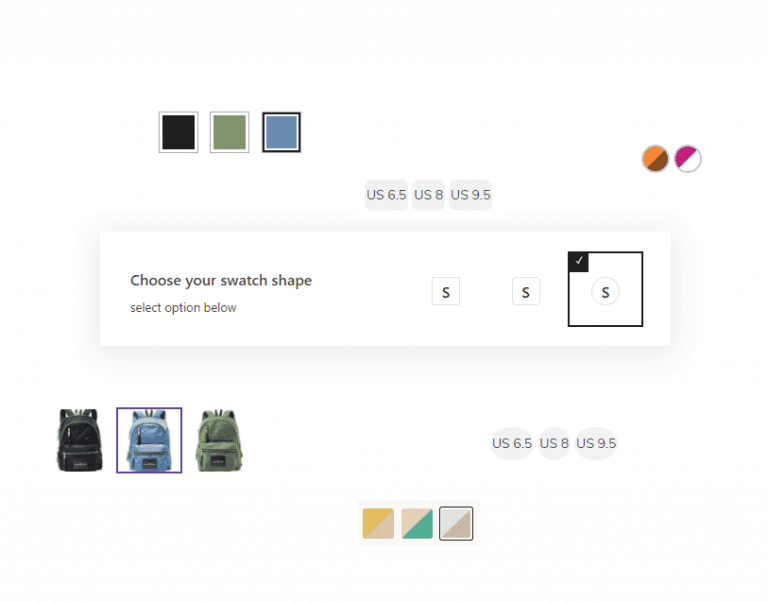
There are a tonne of options available with variation swatches for WooCommerce, including tooltip, size, style, shape, among others. So, customizations, you say it we have it.

  • Get appealing & attractive product variation color swatches, icon swatches, and button swatches for free.
  • Customization control to change colours, fonts, font sizes, images, image sizes and so on.
  • Woo Choice Plugins offer customization appearance and configuration control for easy customization.

It Just Doesn’t Show, It Sells Too.

It may add extra features or polish your product display. It’s not the primary benefit, of maximizing your site conversions.

  • Appealing product display increases user acquisition.
  • Customizations & variations simplify the shopping experience.
  • Great user acquisition and better shopping experience results in better conversions.

Free Video & Image Variation Swatches for WooCommerce

SOLD OUT? Say It With Care.

It’s frustrating. It’s frustrating to find out a product you’ve spent time finding & selecting is not in stock. You should mention it first, and with care. 

  • Grey it out, put a cross on it, or find something else.
  • Hide variations automatically which are not available in stock.
  • There are several other styling options too, explore and select what you find best.

Compatibility Is No Longer A Question

  • Tested on over 200 different devices & browsers.
  • Responsive design that efficiently works on different screen sizes and browsers.
  • Flexible to match different web designs.
  • Super easy to set up for admin. 

Why should you use the pair maker plugin for your clothing websites?

Why should you use the pair maker plugin feature for your clothing websites?

Let’s see what the pair maker plugin does.

The Pair Maker is a product feature on the market. Additionally, no other plugin on the market gives free access to such a function.

A Pair Maker refers to the pairing of two goods according to their compatibility.

In essence, this tool will automatically provide clients with professional advice about what will look best on any chosen item.

It combines and contrasts various ensembles from the admin-listed products before making the best recommendation. As a result, a product bundle (pair) of clothing is created.

What is Pair Maker for online clothing stores?

The first decision the website user will make is whether to buy a pair of jeans or a shirt/t-shirt he prefers (whatever they wish to start with).

The other member of the duo must then be chosen separately

The other half of the pair will be displayed in such a way that the user will have a clear understanding of whether the chosen products go well together or not.

It helps the user understand better what will look best for the chosen item. The user receives a professional opinion (by the plugin)

The buyer observes that he is making his purchase in a new fashion but still using the traditional method of purchasing from an offline retailer. Utilizing this “make pair maker feature” greatly improves the customer experience.

You might be interested in learning more about and experimenting with the Woo Choice Plugin‘s Pair Maker functionality. 

Like Ring Builder, Pair Maker is the main feature of the Woo Choice plugin, and it is compatible with all WooCommerce websites. 

Here are some examples to help you understand the pair maker plugin.

For example, if you sell clothing online, the buyer will automatically receive advice on bottom wear after selecting top wear. 

In the event that the user becomes perplexed, they will be directed by mixing and matching different options, and a pair of clothes will usually be created.

On the official WordPress website, you can download this pair maker plugin. With this addition, offering comparable products in a bulk container using the pair maker plugin strategy is simple. 

Additionally, it allows you to make available as many or as few items in the pair maker plugin assortment box and supports simple and product variations.

Customers customize these items by choosing a number for each item in the selection. The pair maker plugin is therefore perfect for making items like the perfect pair.

How does the pair maker plugins work?

When making online clothes and accessory orders, users can use the fun function called Pair Maker to create pairs.

Choose top outfit

Choose your favourite top and get set to browse the extensive selection of bottom garments.

Select “Make a Pair”

After choosing your top, go to the “Make a Pair” page and experiment with matching bottom garments.

Enjoy Pair

Enjoy Pair Choose, buy, and enjoy the pair.

Woo Choice Plugin: Your One-Stop Online Clothing Website Solution

These factors are enough to show that the Pair Maker feature of the Woo Choice Plugin is essential for any online clothes store.

  • Provides a creative solution for your fashion clothes website with a user-friendly front-end and a successful back-end.
  • Admin setup is simple.
  • Responsive design, which effectively operates on many browsers and screen sizes.
  • Tested on more than 200 different hardware and browser combinations.
  • Search filters that may be customized to match the appearance and features of your website.
  • Flexible to match various web designs.

conclusion

Therefore, if the user becomes confused by chance, the plugin directs them by offering several options from the product catalog that is accessible on your site. Thus, a pair of accessories is made for the consumer.

Although it is expected that users are informed about color matching, this feature is particularly helpful because it can help them choose the right pattern and style of bottom wear, or likewise.

It is good to give this function a try once. It is indirectly given to promote the standard marketing ways to sell more. 

You can also make use of the pair maker option if you have any items that you believe can be sold in pairs, such as clothing, home goods, or anything else.


0