loader image

Category Archive : Wordpress

product video swatches

Free Video and Image variation swatches for your WooCommerce store

Free Video & Image Variation Swatches for WooCommerce

Video and image gallery Variation Swatches for your WooCommerce website is a well-curated tool by Woo Choice Plugin which offers a refined display for your product variations and helps you generate tons of sales.

Let’s create a brand-new experience for your WooCommerce product variations with Woo Choice Plugin’s Variation Swatches.
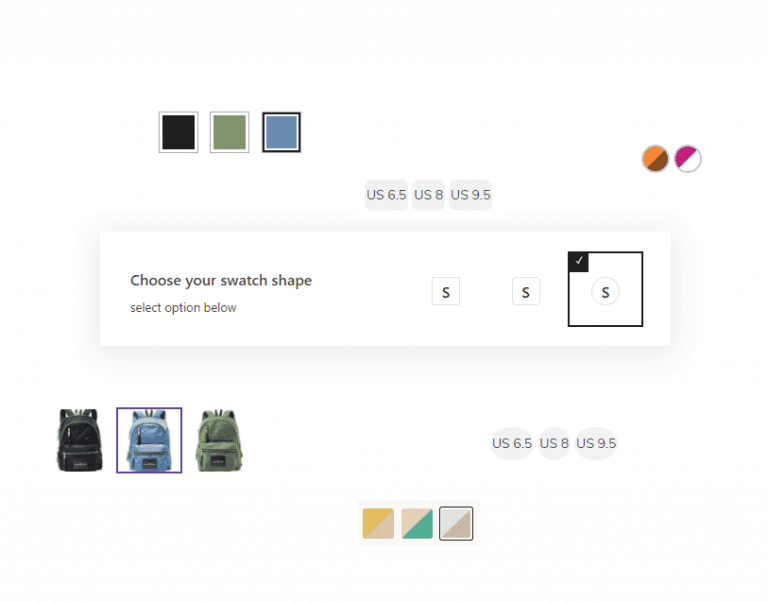
OVERVIEW OF FEATURES WE OFFER

  • Free Variation Swatches For WooCommerce

  • Image & Video Swatches On Shop/Product/Category Pages

  • Embed Free Videos On Shop/Category/Product Page

  • Responsive on different screen sizes & browsers

  • Easy to use User Interface

  • Seamless Customizations

  • Highly Compatible

  • Suitable To All Browsers
  • 3 different Swatch types (colour, image, Video Gallery)

  • No coding required

  • Easy to use backend interface

  • Enable/Disable Swatches for Shop page

  • Responsive for mobile, tablet device

  • Shortcode support

  • Control attribute setting globally.

  • Override global swatch settings for each product individually

Create Interactive User Experience With Interactive Videos [Chill😎, It’s Free]

Add Interactive product videos to your item and category page, polish your product display & make your sales go BOOM. That’s the way to go.

Let The Videos Do The Magic For You

A picture may speak a thousand words, but an Interactive video surely will speak a lot more than that. It may sound a bit poetic, but it has a point. 

  • Videos drove 11% more conversions. More conversions mean more sales.
  • Create an impactful WooCommerce product gallery with high-quality videos.
  • Free Videos on shop/category/product pages. You’ll never find this somewhere else.
  • Host videos anywhere on the web like on YouTube, Vimeo, Dailymotion, etc., we’ve got you covered.
  • Embedding Multimedia – Upload MP4 Videos to your WooCommerce Video Gallery.

Want to convert your MP4 Videos into 360-degree videos? Check out our 360-degree video extension here.

Easy To Setup

Do you know how to browse on google? If yes, you can set this up. Yeah, It’s that easy.

Efficiently Developed

Woo Choice Plugin is a well-curated & efficiently developed solution which works with almost all themes & plugins.

Live Chat Support

Resolving your issues is all we care about, and our live chat support ensures that.

Swatches In Shops Or Category Pages? Psst🤫 That’s Free Too.

Your XYZCommerce may offer video and image gallery swatches on the item page for free, but do they offer free swatches on shop/category pages? Don’t worry, we offer that for free as well.

  • Shop/category pages provied Free Variation Swatches.
  • Variation Swatches on the category page mean users can look at available options even from the category page. 
  • Allows viewing or playing the video on the category page.
  • A slider with relevant videos and images ensures a seamless shopping experience. 

All the way around, Variation swatches by Woo Choice Plugin does its best to create a personalized & seamless shopping experience for your consumers.

Get To Know The Variation Swatches For WooCommerce

How does it work?

Let’s start by saying that it’s nothing complicated. With Woo Choice Plugin, it’s a piece of cake. You can pair variable products with amazing color swatches and build a lucrative product showcase.

  • Select the type of swatch
  • Personalize the way you want
  • Publish your refined product displa

Customisation? We’ve Got Your Back!

There are a tonne of options available with variation swatches for WooCommerce, including tooltip, size, style, shape, among others. So, customizations, you say it we have it.

  • Get appealing & attractive product variation color swatches, icon swatches, and button swatches for free.
  • Customization control to change colours, fonts, font sizes, images, image sizes and so on.
  • Woo Choice Plugins offer customization appearance and configuration control for easy customization.

It Just Doesn’t Show, It Sells Too.

It may add extra features or polish your product display. It’s not the primary benefit, of maximizing your site conversions.

  • Appealing product display increases user acquisition.
  • Customizations & variations simplify the shopping experience.
  • Great user acquisition and better shopping experience results in better conversions.

Free Video & Image Variation Swatches for WooCommerce

SOLD OUT? Say It With Care.

It’s frustrating. It’s frustrating to find out a product you’ve spent time finding & selecting is not in stock. You should mention it first, and with care. 

  • Grey it out, put a cross on it, or find something else.
  • Hide variations automatically which are not available in stock.
  • There are several other styling options too, explore and select what you find best.

Compatibility Is No Longer A Question

  • Tested on over 200 different devices & browsers.
  • Responsive design that efficiently works on different screen sizes and browsers.
  • Flexible to match different web designs.
  • Super easy to set up for admin. 

Top 10 key factors for a successful jewelry website?

By combining our knowledge of both jewelry photography and websites, we’ll give you a fantastic insight into what makes a good jewelry website. 

Prepare to learn everything you need to know about taking your jewelry website to the next level!

1. Represent In Images

Human minds process 90% of all information visually, which is no surprise. Humans perceive graphics 60,000 times faster than words, according to a study conducted by 3M. 

As a result, it’s a no-brainer that the visuals on your website are up to par if you want your potential customers to get the message you’re sending them.

The color scheme, font system, website layout, navigation, and the hierarchy of global elements displayed throughout each page make up your website’s visual representation. 

It’s critical that all of these design elements have a healthy balance, as this will contribute to a positive user experience.

2. Colour Scheme

As previously stated, initial impressions are crucial! Visitors form first impressions in less than two-tenths of a second, according to a study conducted at the Missouri University of Science and Technology.

Customers identify and associate with your brand based on the color scheme you use. When they come to your website, it’s the first thing they see. 

The reason for this is that color schemes load faster than the rest of your website’s pictures.

Color has the ability to convey emotions and set moods. According to a study on the impact of color on marketing, using the right colors can help you connect with your customers or get them to react in a certain way.

3. Speed Of The Pages

When a customer walks into your store, how long does it take you to address them? Even if you’re assisting another customer, you inform them that you’ll be with them shortly. 

You respect their time as much as you hope they respect yours. Your jewelry website needs to be responsive. If you don’t, you’re essentially ignoring your customers. 

If a customer does not feel valued, they will leave. It’s no different on the internet. 

Customers will go to another site if your page does not load within seconds. 

Your goods are well worth the money. Make it simple for them to get there.

4. Images And Product Descriptions Of High Quality

You take great pride in your products. You present it in the greatest possible light in order to demonstrate how light flows through each stone. Each stone was placed to catch light in a specific way. You will sell your item short if you simply take a picture of it. Take high-resolution photos that highlight fine craftsmanship. Spend time writing compelling product descriptions that entice customers to purchase them. They sell their sweetheart’s reaction when she sees the ring, and so on.

Customers will trust you if you can provide them with clear, short product descriptions and high-quality photos. They respect your products and are more likely to purchase more of them.

5. Taking Photographs Of Jewellery

On your website, your jewelry photography is the most valuable digital asset you can have. After all, it’s the finished product you’re selling! And the more photographs you have of your jewelry, the more your potential customers will grasp your artistry and style. There are a few key images that will make your jewelry website shine!

  • Shot in the studio

The studio shot is your main image. Your jewelry should be photographed on a neutral background like white or, less typically, black and grey. Your customer’s attention should be drawn to the jewelry in front of them right away. Check out this blog post for more information on how to use different backgrounds for jewelry.

  • Photographed in a natural setting.

The buyer should be inspired to wear jewelry with specific clothes or for specific occasions after seeing the lifestyle image. It also aids in the creation of a backstory for your jewelry. This photo is usually taken with a model wearing the jewelry.

  • A picture of the scale

When selling jewelry, a scale shot is required so that your customers can see how small or large the piece is. This sets clear expectations for your visitors and establishes product authenticity, improving the possibility of an online purchase.

  • Featured image

Typically, the feature shot is an artistic shot with several elements, such as props and backgrounds. It’s best used on your home page. For this photo, we recommend hiring a professional.

6. 360 Video Features

Online customers can already engage with your jewelry products with their mouse by using 360° product pictures and videos.

They can rotate the photographs to any angle they like, click or drag them in any direction they want, till they’re happy and ready to buy. 

Customers can hold a piece of jewelry in their hands and examine it from every angle.

The easiest way to duplicate this in-store experience on your website is to have a 360-degree video of each piece, which will help your jewelry website stand out from the crowd. Woo choice plugin provides 360/3D interactive video plugin for jewelry and diamond websites.

If you’re one of those jewelers, we’re pleased to inform you that we’ve put together a thorough guide to jewelry photography that you can view on a single page. 

You don’t need to use your browser with numerous tabs any longer!

The only way to earn your customers’ trust online is to be consistent with your messages and pictures. Maintain consistency in your backdrops, angles, and scale. 

To begin with, using the same camera and lighting equipment for your studio images is the best approach to maintain consistency.

7. Provide Content That’s Also Valuable.

People that visit your website should be able to interact with it. 

Filling our site with educational and entertaining videos, having a live chat screen, and displaying deals and coupons for first-time users are all excellent methods to communicate. 

However, while all of these methods are excellent, you must remember that pop-ups should not be overwhelming and should not drive your customers away.

8. Responsive To Mobile Devices

Do you know that mobile phones account for 53.4% of all internet traffic? Do you realize that having a mobile-friendly website is a must? 

If your jewelry website isn’t mobile-friendly, you’re losing a lot of customers. They will leave your website and never return.

Whether you’re selling gold jewelry, imitative jewelry, or any other type of jewelry, your website should be simple to use. 

9. Validity And Accuracy Of The Product

In the past, having a gallery of photographs that reflected your product offering was perfectly fine. Visitors would be satisfied with viewing a slideshow of these photographs before deciding whether to visit your business or submit questions through your website. 

This is no longer enough to entice visitors. Great photography, adequate facts to indicate the product’s minimal validity, and the availability of when the thing may be delivered are all required on your product detail pages.

10. Payment Options That Are Safe and Secure

Having secure payment options has a lot of benefits, including the following:

Customers will trust that their personal information and money are safe in the hands of a Secured Gateway.

It facilitates international payments.

It’s convenient because most consumers’ information is saved.

9 Best WooCommerce Ajax Product Filter Plugins To Use In 2022

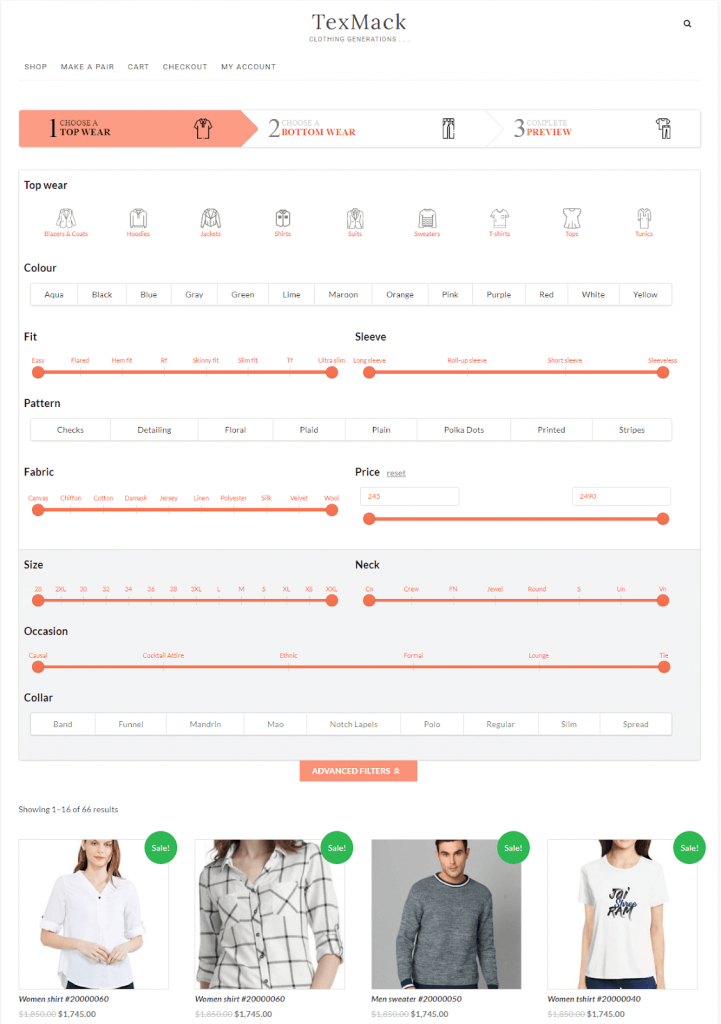
A horizontal Product Filter means filters are arranged horizontally on the webpage. With the help of the Woo Choice Plugin(free), you can add an advanced ajax Horizontal Filter for any WooCommerce product page (like the Shop page or Category page).

You can cover any kind of advanced or custom requirements using Horizontal Product Filter because in Woo Choice Plugin it had grown mature and covered all kinds of requirements, you can add Sliders, Buttons, Icons filters, dropdown-based filters, Checkbox based filters, radios, and the list goes on.

Thanks to Jewelry Diamond Industries, Woo Choice Plugin had matured Horizontal Filters to its best because Jewelry and Diamond Industry requires advanced and visually appealing Horizontal filters, especially for Diamond search pages. But now we are excited to offer these filters for the entire eCommerce industry because it can be proved very useful in clothing or any other requirements. You can take a look at a Horizontal Filter that is set up with Woo Choice Plugin here.

Woo Choice Plugin provides many advanced & customizable features. ShortCode Filters are also available in Woo Choice Plugin, which has the power of adding horizontal filters anywhere on any web page.

Advantage

  • It’s Free.
  • It’s advanced and fully customizable from every part.
  • It’s easy to use. 
  • You can customize appearance and design as per your requirements.
  • You can add customize CSS.

How to add Horizontal Filter for WooCommerce Product Module via Woo Choice Plugin?

First of all, just Install and Activate Woo Choice Plugin. For Installation and Setup, follow the Documentation page here.

You can follow the below instruction and complete the setup wizard and sample data process. And, you will get filters the same as it is displayed in the snap below. Otherwise, you follow so manual process given below.

For Diamond Jewelry:

For Clothing:

So, just add products data via WooCommerce and then follow the steps given down below to add or create a Horizontal Product Filter.

If you prefer doing setting up everything manually only then follow from below.

Firstly, create one category and add products via WooCommerce.

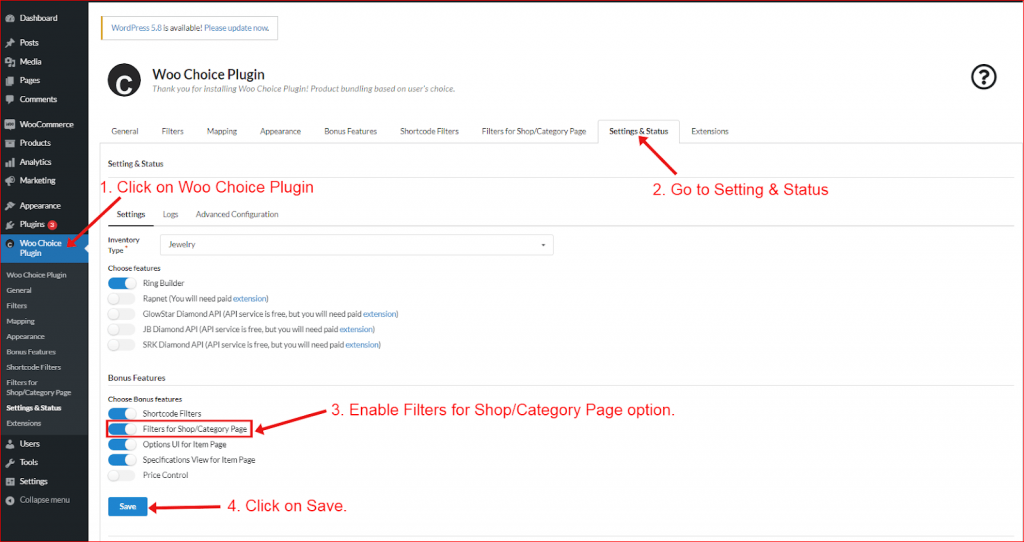
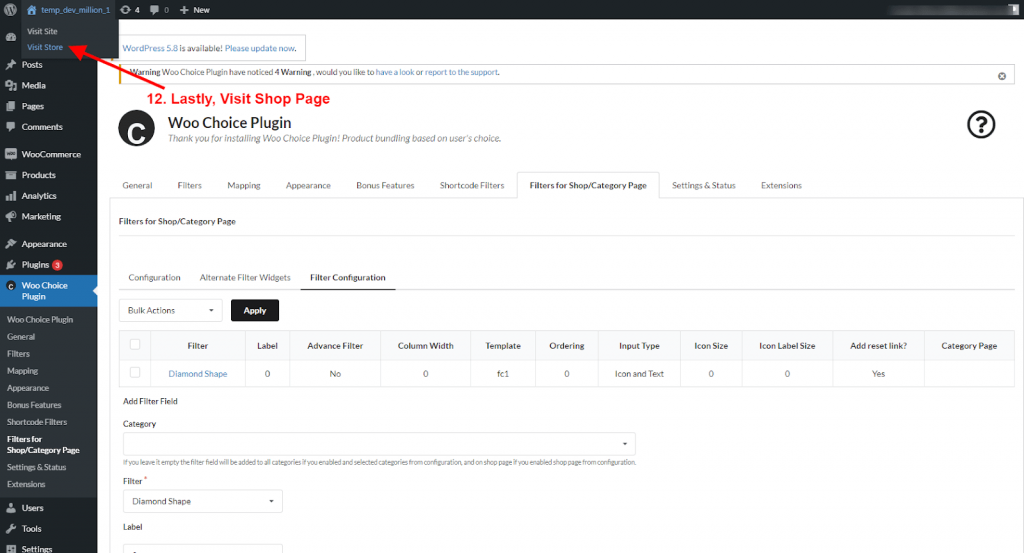
Step: 1 Go to Woo Choice Plugin admin panel > Setting & Status> enable Filters for Shop/Category page option. And, you can also follow the documentation of the Shop/Category tab. 

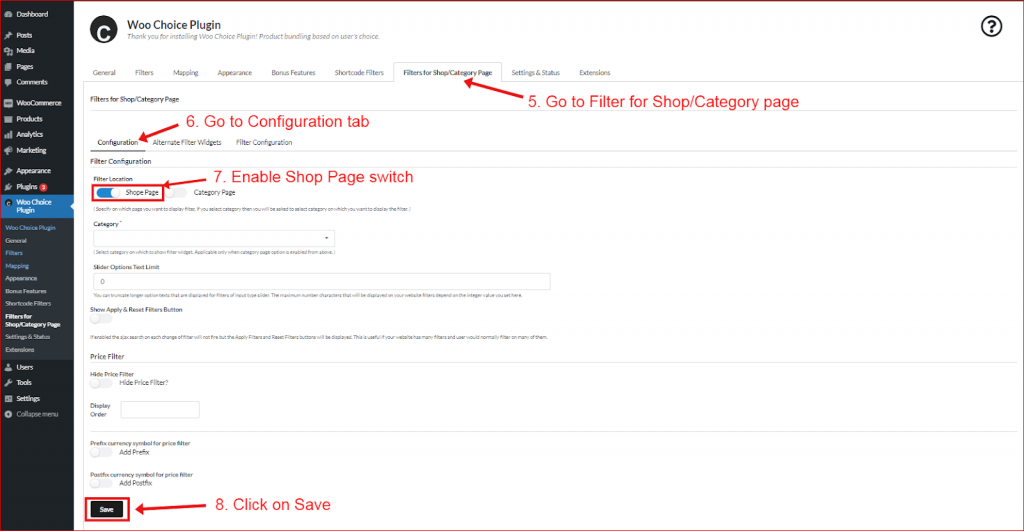
Step: 2 Go to Filter for Shop/Category page> Configure tab> Enable Shop page and Category Page options.

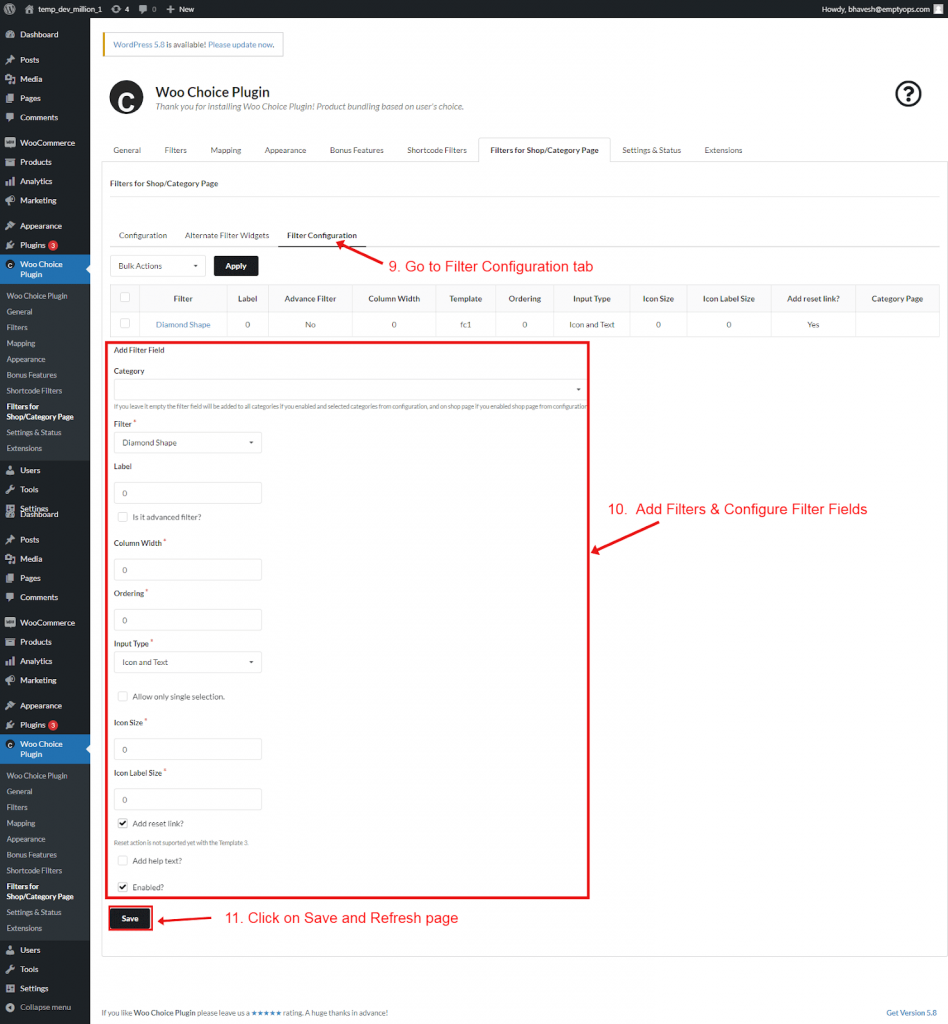
Step: 3 Now, go to the Filter Configuration tab (beside Configuration and Alternate Filter widget tab) and add Filters & configure Filter Fields(which you want to show on the front end of the Shop page or Category or any page).

Step: 4 After configuration and adding filters, lastly save it and refresh.

Lastly, the output will look like the number of filters and the kinds of filters you have added for the manual way.

To know more about our plugin and extensions, visit here.


0